The firmware of NAMeC
This documentation is here to help you have a high-level overview of the different repositories and custom librairies used throughout the different firmware.
Pipeline of speed commands
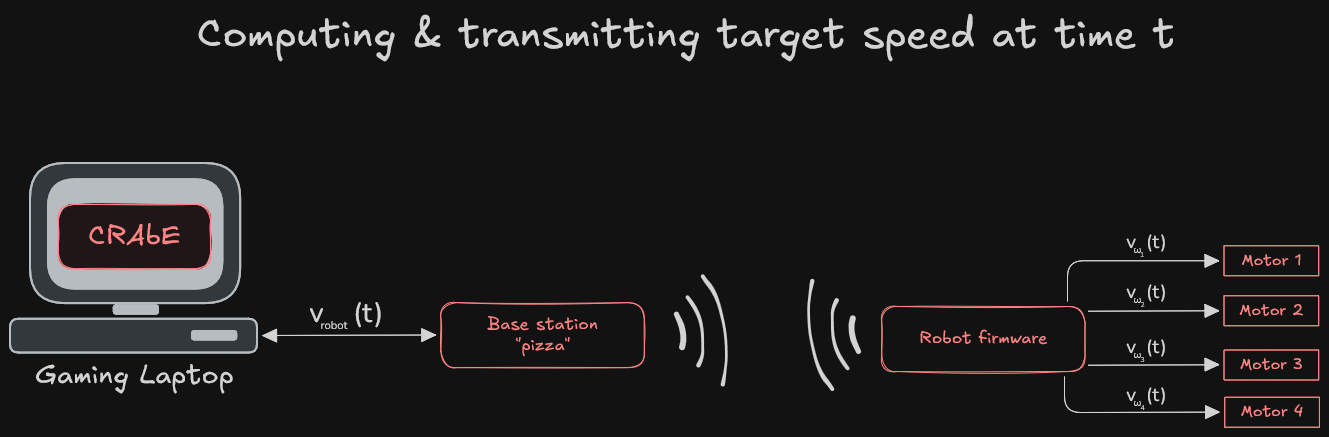
Today, each robot listens to speed commands. The CRAbE software is responsible for computing that speed command, converts it in the robot’s frame and sends it to the base station for emission.
Components firmware
There are two separate embedded systems that communicate together, the robot’s mainboard, and the base station. Electronically, they are the same board, but they have different firmware
Inside of the robot, a total of 4 different CPUs have their own firmware, namely
- the robot’s mainboard firmware
- the dribbler card
- each motor card
- the kicker card
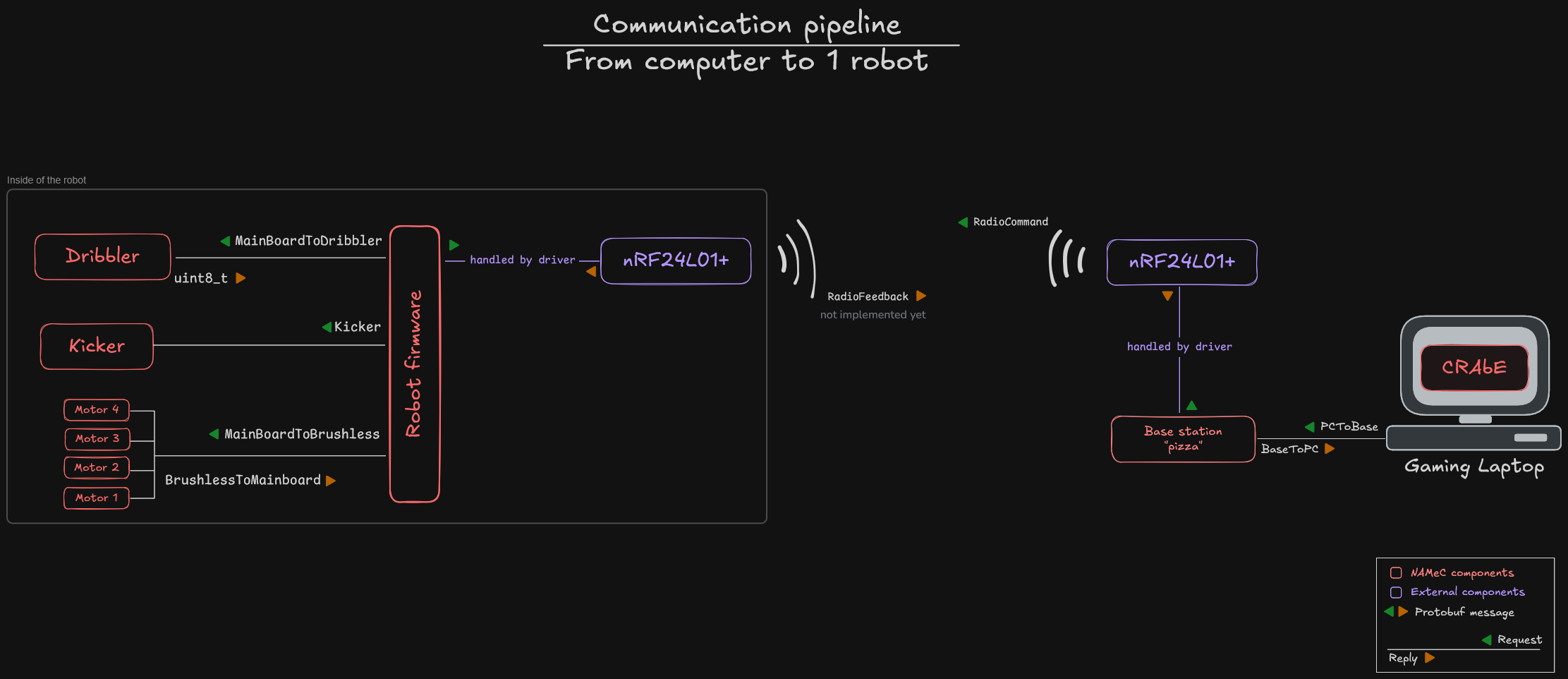
Each of those have their own repository inside the NAMeC-Team organization on GitHub. But some librairies have been tailored for usage with our firmware, such as the library handling our radio module. You can find them in the Repository links chapter. The following graph sums up how the different components communicate, on a request-reply pattern. Requests are shown with a green triangle, and replies with an orange triangle.
Dev environment
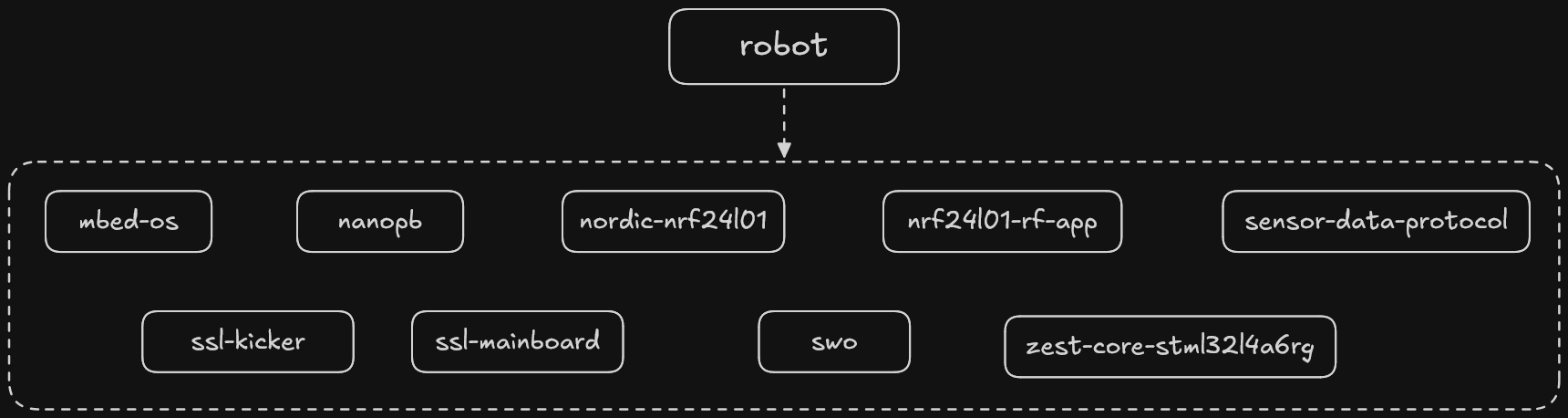
Almost all of our repositories use the mBed RTOS. Briefly, you’ll find in an mBed project
- the source code inside
src/ - one
.libfile per library and its associated folder (that appears after runningmbed deploy) - a .mbed file describing the project
- a
BUILDfolder that contains the compiled code
This means you can find out which librairies a project uses by looking at the .lib files, which are merely links to Git repositories.
Only the dribbler, which uses STM32CubeIDE, is compiled differently. One day we’ll move it to mBed (or something else, idk).
Protobuf for message transmission
All of the messages transmitted are Protobuf packets (except for the radio module). We use the nanopb library to serialize and deserialize them.
For those who don’t know Protobuf, it’s a way of easily transforming structured data into binary. We define the structure of our message in .proto files, and the Protobuf compiler’s job is to transform those into structures or objects, in the language of our choice (in our case, C++).
The main advantage of Protobuf is that packet size is variable : fields set to 0 in a message will dissapear in the resulting binary message transmitted.
Refer to the Protobuf docs for more details on what it is and how it works.
All Protobuf messages can be found in the sensor-data-protocol internal library.
The following drawing shows how the base station, the robot firmware and its components communicate together. All transmissions inside the robot are done via SPI, robot firmware is the master and initiates all communications, annotated with a green triangle, and component responses are annotated with a red triangle.
Base station to robot communication is performed over radio, on a specific frequency assigned at the RoboCup
Flashing
We use a JTag connector to flash the robot, motor, and dribbler firmware. The way you must plug in the cable is (to be described)
Crashes in mBed
Memroy safety is present to some degree inside mbed-os, such as dereferencing a null pointer, or accessing invalid memory.
When a crash occurs, information about the crash can be retrieved, thanks to the swo library.
Do not turn off the robot, plug a JTag connector the same way you would flash the robot, and run JLinkSWOViewer in any terminal.
After syncing with the CPU clock, you’ll see what caused the crash inside the terminal.
Note
Sometimes, you won’t be able to sync with the CPU clock inside
JLinkSWOViewer. No one in the team has found the answer for that, the only tip we have is to print a lot of stuff to be able to sync correctly.
Robot firmware
Dependencies
Characteristics & TL;DR
- Single core CPU - STM32L4A6RG
- Multitasking & multithreading provided by mbed-os
- Interrupt-based radio handling
- Everything processed in a mBed EventQueue
- Sends orders to all other components
- Stop motors after timeout, refreshed on command reception
Main loop
The robot firmware uses a mBed EventQueue across the code to perform tasks. At startup, the robot just initializes necessary objects and runs the EventQueue loop indefinitely.
Two types of events are processed by the EventQueue’s dispatch_forever() loop : radio packet reception
and periodic motor communication
Because the CPU used is single core, there is no possibility for race conditions or concurrent access to variables, except during an interrupt.
Speed conversion
When a new command is received from the radio, robot firmware converts this robot frame speed into four motor speeds. How these formulas were obtained couldn’t be found across the TDPs, but someone from the team has verified these formulas.
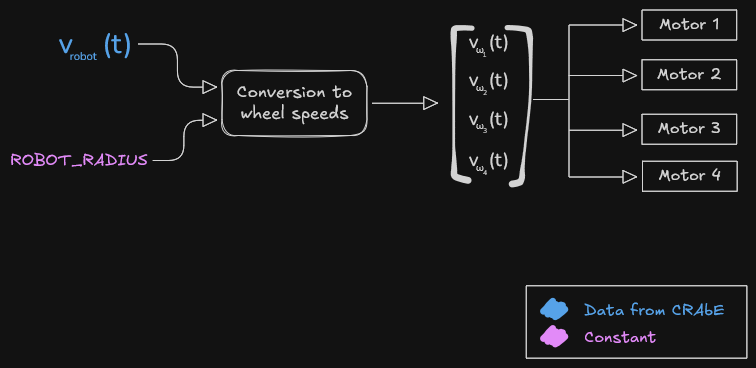
This conversion is performed in the compute_motor_speed() function, which reads the current command data parsed from the radio to change the target speeds for each motor.
These target speeds are transmitted with periodic events, described in the next section.
Motor communication
Periodic transmission
We start a periodic communication with each motor card on the SPI bus. Access to the SPI bus is mutex-protected and is automatically handled by the EventQueue. The mutex is important because electronically, all motors are connected to the same SPI bus.
Structure of the packet transmitted on the wire is composed of a Protobuf message, prefixed by a packet length and suffixed by a 32-bit CRC.
The messages passed are MainboardToBrushless and BrushlessToMainboard, stored in brushless.proto inside the sensor-data-protocol repository, alongside a 32-bit CRC value next to the packet.
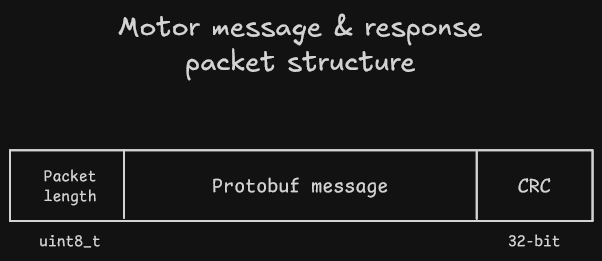
There are error counts available for display which represent the number of times the CRC check failed, either when the motor card receives a message (TX error), or when the robot receives the reply (RX error).
SPI Watchdog
A watchdog is in place inside the motor code, such that if the motor does not receive any SPI message after a fixed amount of time, the motor reboots entirely. This stems from the fact that F1 chips on the motor cards had a bug that blocked the SPI bus (or at least that was what I was told), so this measure has been put in place.
This watchdog is a very good way of determining if the robot firmware crashed. When that happens, all motors will reboot continuously while a green led is blinking ontop of each motor card.
Orders sent
The motors are speed-controlled and obey to the commands they’re told to perform by the robot card.
Once we receive a speed order from the decision software, through the base station, we transform this robot-frame speed order into 4 separate target speeds to transmit to each motor. This is performed in the compute_motor_speed() function.
The mathematics are based on formulas that were tailored for our robot, which is uneven because two wheels are at a 30 degree angle, and the other two wheels at a 45 degree angle. You can search up one of the TDPs of NAMeC that should explain these formulas more in detail.
On their side, the code of the motors have their own PID to ensure the ordered target speed is respected. Tuning of the PID coefficients has been performed some years ago, but never tuned again.
Receiving commands over radio
Robot ID is hardcoded inside the robot. The nRF24L01+ radio module we use can have a physical address that can be assigned at startup. Our code does not make use of this feature (yet). Instead, we broadcast the radio command to all robots (they all have the same physical address), making it go through the radio module, that forwards it to our code.
Inside our code, we deserialize the Protobuf packet, and check if this packet is meant for us (there is a robot id field in the packet). If this packet wasn’t meant for us, we ignore it.
Time consumptino of this operation was not benchmarked, but it is pretty clear that it is very inefficient (why would robot 5 have to process 6 packets where it could’ve only processed 1 instead ?).
Dribbler control
Base station
Motor
Dribbler
Kicker
Repository links
All repositories are hosted on GitHub, in the NAMeC-Team organization. If you do not have access, please contact the team leader (on Discord, preferably).
Code repositories
Internal libraries
- Protobuf messages
- nRF24L01 radio module driver
- Wrapper on nRF24L01 driver
- Mainboard pin mappings (I think ?)
External libraries
- mBed
- 6tron Zest core
- nanopb : it’s weird, we cloned the official repo in our organization. that seems anormal.
All of the following are hosted on our GitHub org, but not made by us