The firmware of NAMeC
This documentation is here to help you have a high-level overview of the different repositories and custom librairies used throughout the different firmware.
Pipeline of speed commands
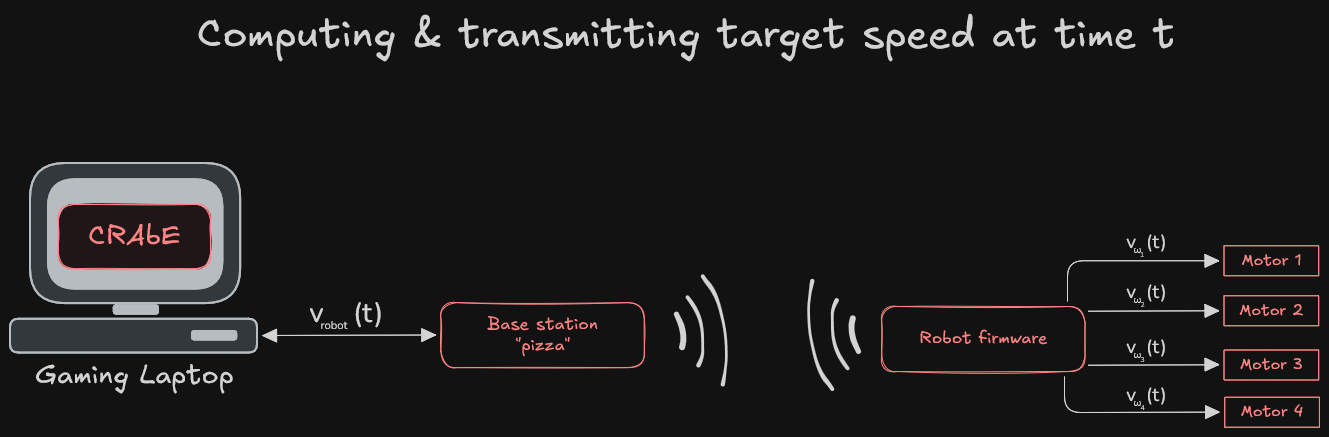
Today, each robot listens to speed commands. The CRAbE software is responsible for computing that speed command, converts it in the robot’s frame and sends it to the base station for emission.
Components firmware
There are two separate embedded systems that communicate together, the robot’s mainboard, and the base station. Electronically, they are the same board, but they have different firmware
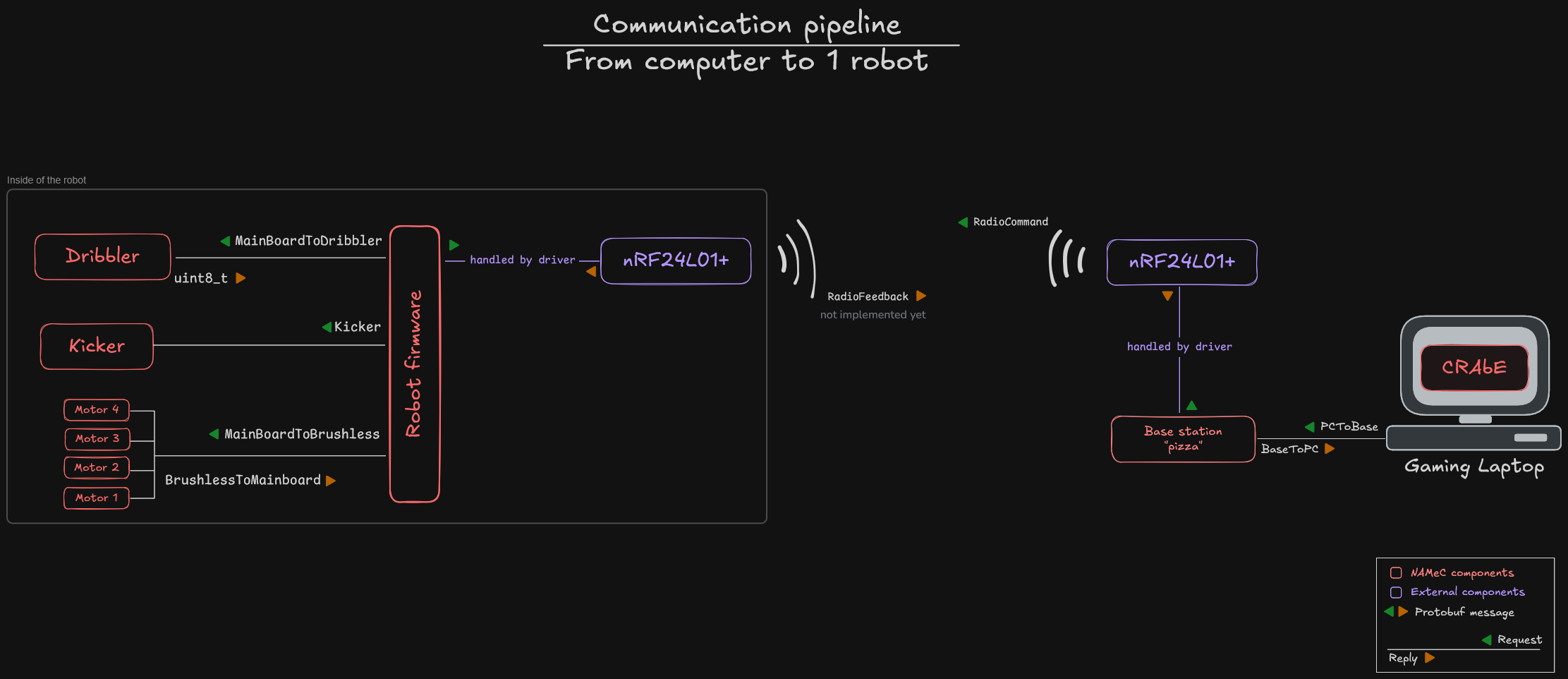
Inside of the robot, a total of 4 different CPUs have their own firmware, namely
- the robot’s mainboard firmware
- the dribbler card
- each motor card
- the kicker card
Each of those have their own repository inside the NAMeC-Team organization on GitHub. But some librairies have been tailored for usage with our firmware, such as the library handling our radio module. You can find them in the Repository links chapter. The following graph sums up how the different components communicate, on a request-reply pattern. Requests are shown with a green triangle, and replies with an orange triangle.
Dev environment
Almost all of our repositories use the mBed RTOS. Briefly, you’ll find in an mBed project
- the source code inside
src/ - one
.libfile per library and its associated folder (that appears after runningmbed deploy) - a .mbed file describing the project
- a
BUILDfolder that contains the compiled code
This means you can find out which librairies a project uses by looking at the .lib files, which are merely links to Git repositories.
Only the dribbler, which uses STM32CubeIDE, is compiled differently. One day we’ll move it to mBed (or something else, idk).
Protobuf for message transmission
All of the messages transmitted are Protobuf packets (except for the radio module). We use the nanopb library to serialize and deserialize them.
For those who don’t know Protobuf, it’s a way of easily transforming structured data into binary. We define the structure of our message in .proto files, and the Protobuf compiler’s job is to transform those into structures or objects, in the language of our choice (in our case, C++).
The main advantage of Protobuf is that packet size is variable : fields set to 0 in a message will dissapear in the resulting binary message transmitted.
Refer to the Protobuf docs for more details on what it is and how it works.
All Protobuf messages can be found in the sensor-data-protocol internal library.
The following drawing shows how the base station, the robot firmware and its components communicate together. All transmissions inside the robot are done via SPI, robot firmware is the master and initiates all communications, annotated with a green triangle, and component responses are annotated with a red triangle.
Base station to robot communication is performed over radio, on a specific frequency assigned at the RoboCup
Flashing
We use a JTag connector to flash the robot, motor, and dribbler firmware. The way you must plug in the cable is (to be described)
Crashes in mBed
Memroy safety is present to some degree inside mbed-os, such as dereferencing a null pointer, or accessing invalid memory.
When a crash occurs, information about the crash can be retrieved, thanks to the swo library.
Do not turn off the robot, plug a JTag connector the same way you would flash the robot, and run JLinkSWOViewer in any terminal.
After syncing with the CPU clock, you’ll see what caused the crash inside the terminal.
Note
Sometimes, you won’t be able to sync with the CPU clock inside
JLinkSWOViewer. No one in the team has found the answer for that, the only tip we have is to print a lot of stuff to be able to sync correctly.